Browser interface and gateway
The same agent from a browser or a phone, served from one port.
Every motita process is also a gateway: it listens on 127.0.0.1:7477 behind a token, and the terminal you are looking at is just one of its clients. A web page or a phone can join the same conversation, with the same skills and the same history.
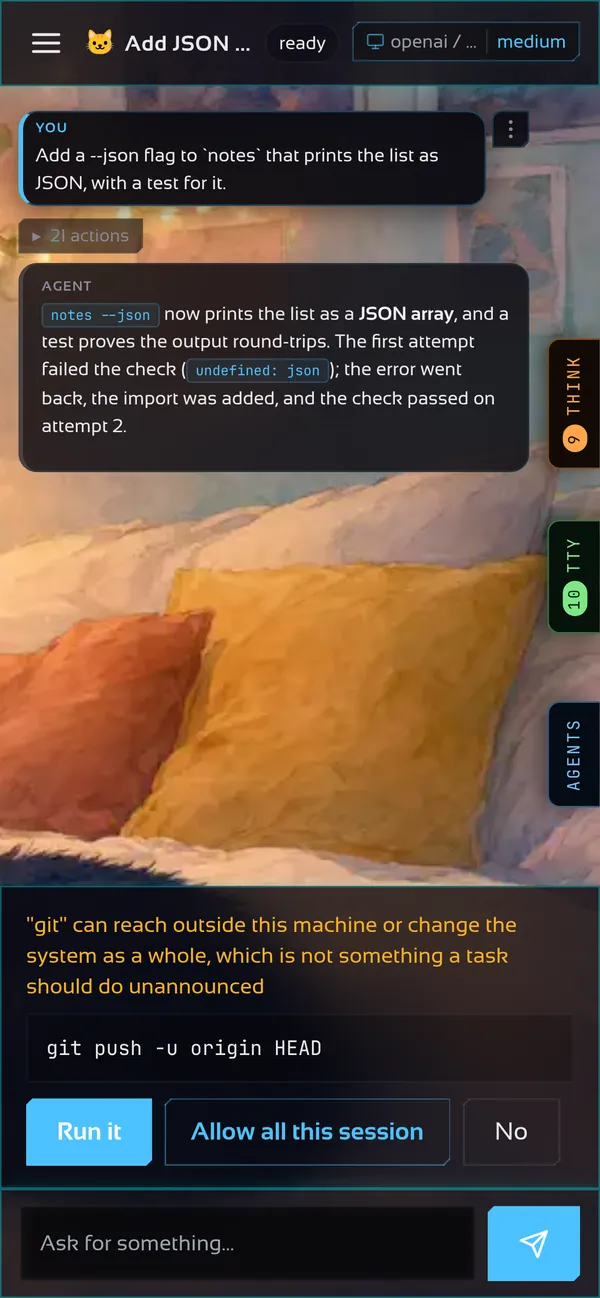
The browser interface
It is served from the gateway's own port, so there is no second server and no cross-origin setup. Open http://127.0.0.1:7477, paste the token once, and you have chat, projects, settings and the skill library. It installs as an app (PWA) and is compiled into the binary.
The token is read from ~/.motita/gateway.token and printed by motita gateway start.
Running the gateway
motita gateway start    # start the service and wait until it answers
motita gateway status   # is one running, where, and which build
motita gateway stop
motita gateway setup    # where it answers: this machine, the LAN, everywhere
If a gateway is already running, motita attaches to it and never shuts it down. If none is running, it brings one up for itself and stops it when you leave.
The two halves apart
# on the machine that runs the commands
motita -serve -gateway 127.0.0.1:7477

# anywhere else: no sandbox, no agent in this process
motita -connect 127.0.0.1:7477 -tui
A -connect client is only an interface, so it runs on a laptop, a tablet or a phone through a tunnel. Reaching it from other machines safely is covered in Network and remote access.
More than one conversation
A gateway holds many sessions at once. The model belongs to the session, so changing it affects that conversation only, and survives a restart. Other programs can drive the same sessions over HTTP, server-sent events or a WebSocket protocol; the reference lists every endpoint.